
All chapters (4/12)
User Guide / Chapter 4
In-Game Commands
Teammates type commands starting with ! in game chat, and the app replies right in chat. No need to alt-tab.
Make sure Chat Commands is on
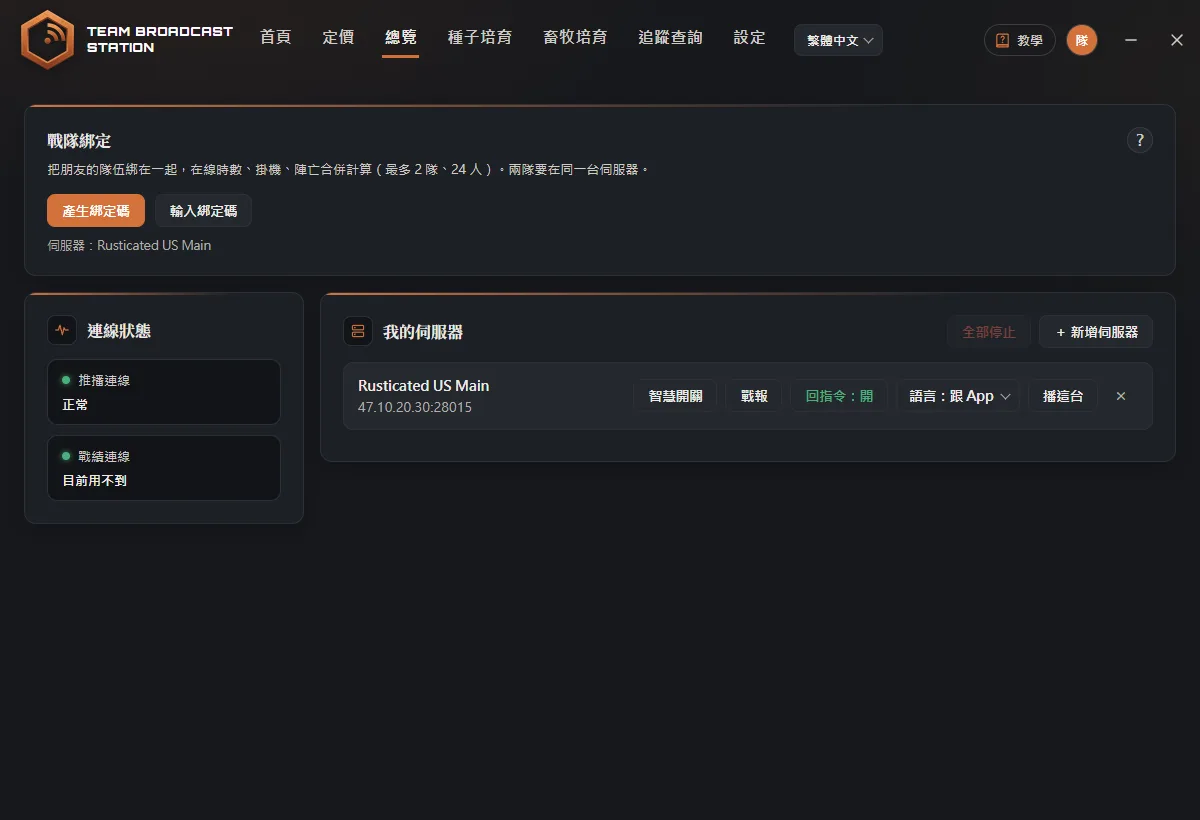
(Screenshots show the Chinese version of the app. Switch the app to English from the language menu in the top bar. Button names below are the English labels, followed by the Chinese label so you can match the screenshots.) In My Servers (我的伺服器), check that the server is broadcasting (started with Start (播這台)) and shows Chat Commands: On (回指令:開).
Type a command in game chat
Type commands in the channel the app broadcasts to: clan chat if you're in an in-game clan, team chat only if you're not (the app won't reply in the other channel). For example, type !pop and press Enter. Within a few seconds the app replies in the same chat.
TipA full-width "!" from a Chinese keyboard works too. Many commands also have Chinese versions, in both Traditional and Simplified. Replies use the language set on that server's row (Lang: English, Lang: Chinese (T), or Lang: Chinese (S)).Forgot a command? Type !help
Type !help and the app lists every command. If you make a typo, it suggests "Did you mean…".
TipEach player can send up to 3 commands per 10 seconds, and the whole team up to 8 per 10 seconds. Anything faster is skipped without a reply (the person running the app isn't limited).
Commands
| Command | What it does |
|---|---|
!pop (!online) | How many players are online right now, how much that changed over the last hour, and the queue size if there is one. |
!team | Who on your team is online and who is offline. |
!clan | Online list for the whole clan. For offline members, shows how long ago they were last online. |
!afk | Who is AFK right now, for how long, and in which grid. |
!afktop | AFK leaderboard for the last 24 hours. Type "!afktop reset" to reset it to zero. |
!time | Current in-game time and how long until night or day. |
!where (!pos) | Which grid you're in right now. Only works if you're on the same team as the account running the app. |
!events | The last 5 events the app posted, so you can catch up on anything you missed. |
!farmer | Sulfur gathering leaderboard for the whole clan this wipe. Add a resource after it, for example "!farmer wood". Options: wood, stone, metal, hqm, leather, fat, bone. Rustoria servers only. |
!kd | Kill/death leaderboard for the whole clan this wipe. Shows two numbers: the official KD, and a "fights-only KD" with suicides removed. Rustoria servers only. |
!leader name | Gives team leader to a teammate. Leave the name out to give it to the person who typed the command. Only works while the team leader is the account running the app. |
!sm alias | Turns a Smart Switch on or off remotely, for example "!sm aa". If it's already off, typing it again turns it back on right away. Type just !sm to list your switches. See "Smart Switches". |
Your custom switch command | A command you set up under Smart Switches, for example !sp. Type it once to toggle the matching switch. |
!help | Lists all commands. |
!preview | Only the person running the app can use this. Shows a sample of every alert type using fake data, then runs the common commands for real, so you can check the wording. |
FAQ
Nothing happens when I type a command?
First check that the server is broadcasting in the app and set to Chat Commands: On (回指令:開). Then make sure you didn't send too many commands within 10 seconds. If what you typed isn't close to any command, the app stays quiet on purpose, so it doesn't spam chat or clash with other chat tools. Also make sure you typed in the channel the app broadcasts to: clan chat if you're in a clan.
!farmer and !kd say "Rustoria servers only"?
The data for these two leaderboards comes from Rustoria's official stats, so they only work on Rustoria servers. On other servers, check the estimated kills and gathering in Wipe Recap instead.
Why don't the old !shop and !時數 (playtime) commands work anymore?
The game removed vending machine data from Rust+, and the playtime leaderboard's data source became paid, so both kinds of commands have been retired. If you type them, the app replies that they're retired.